Introduction
CommonJS vs ES: If you’re diving into NodeJS, you’ll quickly encounter two prominent module systems: CommonJS and ES Modules. Understanding these systems is crucial for structuring your applications effectively. In this article, we’ll explore the fundamental differences between CommonJS and ES Modules, helping you make informed decisions for your NodeJS projects. This article will offer practical examples, real-world scenarios, and clear explanations, perfect for beginners.
Table of Contents
Module systems are at the core of modern JavaScript development. They allow developers to break down their code into reusable components, enhancing maintainability and organization. Both CommonJS and ES Modules serve this purpose but with different syntax and functionalities. Let’s break them down one at a time.
What is CommonJS?
CommonJS is a module standard widely used in NodeJS. It’s designed for server-side JavaScript and allows the use of require and module.exports to manage modules. This approach has been around for quite some time and is the backbone for many libraries available in the Node ecosystem.
For example, when you want to use a function or variable from another file, you would typically require that file like so:
const myModule = require('./myModule');This line imports the `myModule` file, making its exported functionalities available for use in the current file.
What are ES Modules?
ECMAScript Modules (ES Modules), on the other hand, is a newer module system introduced with ECMAScript 6 (ES6). It’s designed to work seamlessly in both browsers and NodeJS environments. ES Modules use the import and export syntax, providing an easy-to-read structure and a clear way to manage dependencies.
For instance, if you want to import a module in ES6, you’d write:
import myModule from './myModule.js';This import syntax is more intuitive and aligns nicely with the overall structure of ES6.
Comparison of Syntax
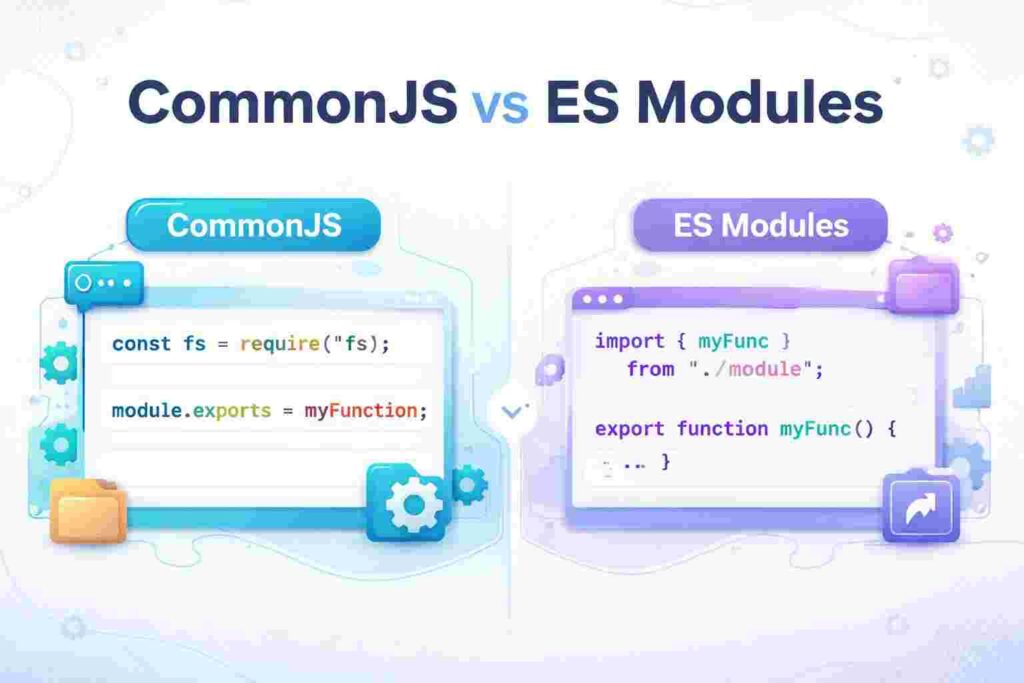
Here’s a concise comparison of the two module systems in terms of syntax:
| CommonJS | ES Modules |
|---|---|
module.exports = myFunction; | export default myFunction; |
const myModule = require('myModule'); | import myModule from 'myModule'; |
As observed, the syntax differences are quite significant. CommonJS’s require makes it suitable for synchronous loading, while ES Modules allow for asynchronous loading via dynamic imports.
Loading Mechanisms
CommonJS loads modules synchronously. This means when your application starts, it reads all the required modules before executing the rest of the code. This can slow down application startup times, but it ensures that all dependencies are loaded before proceeding.
In contrast, ES Modules can load modules asynchronously. This is advantageous because it enables lazy loading of modules, leading to faster application boot times. While this mechanism allows developers to improve the performance of their applications, it can add complexity if not managed correctly.
Real-World Scenario: Building a Simple API
Imagine you’re building a REST API in NodeJS. If you decide to structure your project with CommonJS, you might organize your files as follows:
project/
 ├── api/
 │   ├── users.js
 │   └── products.js
 └── app.js
In users.js, you would define your user handling logic and then export it using module.exports.
// users.js
const getUsers = () => {/* logic */};
module.exports = { getUsers };
In app.js, you’d use require('./api/users') to access the exported functionality.
If you opted for ES Modules, the structure remains the same, but you’d use the export syntax in your files:
// users.js
export const getUsers = () => {/* logic */};
This approach would allow you to import the user functions like so:
import { getUsers } from './api/users.js';Real-World Scenario: Developing a Web Application
In a web application, when you need to integrate a library, the module system you choose can significantly affect how you structure your code. For example, using a frontend framework like Vue or React alongside NodeJS, you might prefer ES Modules for their compatibility with browser environments.
Browser Compatibility
As of now, modern browsers fully support ES Modules, making them an excellent choice for frontend development. This universality means that you can use the same module system across your client-side and server-side code, potentially reducing the friction between development environments.
Conversely, while CommonJS remains widely used on the server, it’s not supported in the browser. This distinction can lead to inconsistencies, especially if your web application employs NodeJS for its backend.
Interoperability Between Systems
One intriguing aspect of this topic is that both systems can coexist. NodeJS provides ways to enable interoperability between CommonJS and ES Modules. You can import an ES Module from a CommonJS module and vice versa by using specific methods.
This flexibility is beneficial when transitioning to ES Modules or integrating libraries that rely on different module systems.
Conversion Tools and Strategies
If you find yourself needing to convert from one system to another, several tools and strategies can help. For instance, Babel, a popular JavaScript compiler, can transpile ES Module code into CommonJS, enhancing backward compatibility when necessary.
Using tools like Webpack, you can also bundle your modules for browser deployment, which can automatically handle these conversions based on your configuration, simplifying the development process.
Best Practices for Module Management
When working with modules, several best practices can ensure smooth development. Always use relative paths for local modules to avoid confusion, especially in large applications. Grouping your related modules into specific directories helps maintain clarity.
For ES Modules, consistently append the file extension (.js) in your import statements. This practice minimizes errors and adheres to best coding standards, promoting better understanding amongst team members.
When to Use Each Module System
Your choice between CommonJS and ES Modules can depend on several factors. If you’re working on a legacy NodeJS project or rely on older libraries, CommonJS might be your best bet. However, if your goal is to create modern applications that leverage advanced features and promote better performance, ES Modules are typically the way forward.
Common Pitfalls to Avoid
One common mistake developers make is mixing the two module systems, which can lead to unpredictable behavior. It’s crucial to carefully plan your module architecture to ensure everything functions as intended.
Another pitfall is ignoring the asynchronous nature of ES Modules. If you’re not cautious, you might run into issues where your application tries to use a module before it has been loaded, leading to runtime errors.
Frequently Asked Questions (FAQ)
1. What is the main difference between CommonJS and ES Modules?
The primary difference lies in their syntax and loading behavior. CommonJS uses require and module.exports, while ES Modules use import and export. CommonJS loads modules synchronously, whereas ES Modules allow asynchronous loading.
2. Can I use CommonJS and ES Modules in the same project?
Yes, NodeJS supports interoperability between the two systems. You can import ES Modules in CommonJS files and vice versa, though doing so requires careful handling to avoid issues.
3. Which module system should I use for my NodeJS project?
It depends on your project’s requirements. For new projects, ES Modules are recommended. If you’re maintaining older code or using legacy libraries, CommonJS may be more suitable.
4. Are ES Modules supported in all browsers?
Yes, modern browsers provide full support for ES Modules, making them a versatile option for both client-side and server-side JavaScript development.
5. What can I do if I need to convert modules from one system to the other?
You can use tools such as Babel for transpiling ES Modules to CommonJS. Communication between different module systems can also be facilitated through configuration in build tools like Webpack.
Conclusion
In conclusion, understanding the differences between CommonJS and ES Modules is essential for any developer working with NodeJS. Each system has its strengths and weaknesses that make it suitable for different scenarios. By grasping these concepts, you can improve your coding practices and build more effective applications. Keep experimenting with both systems, and you’ll find the right tool for each task.